
Documentation: https://docs.pimzu.com/fivem/omnicore/locations
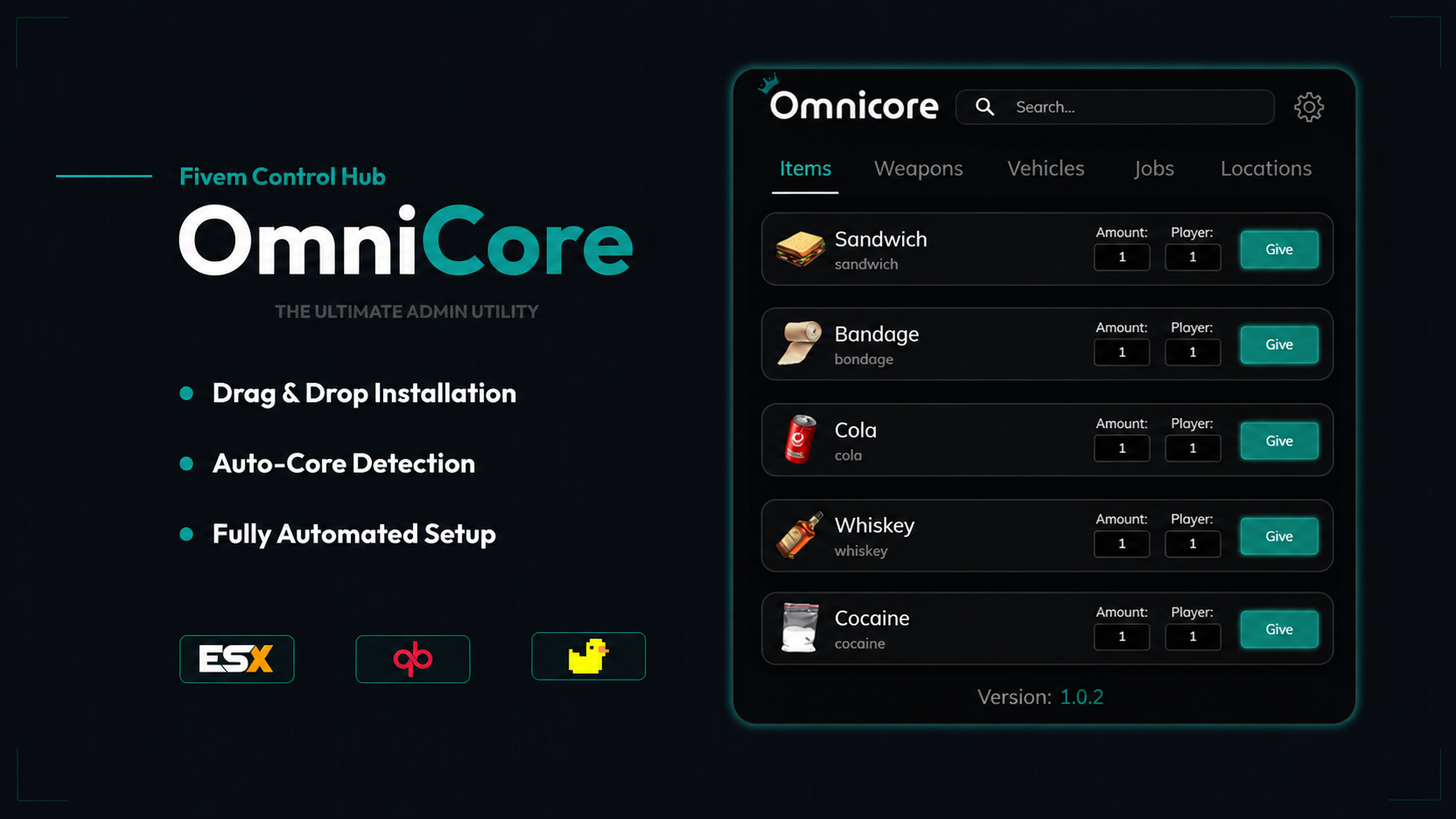
OmniCore is a sleek, modern, drag-and-drop control panel built to make server management effortless, visual, and insanely fast.
Whether you’re running QBCore, ESX, QBX, or a custom framework — OmniCore automatically pulls your items, cars, weapons, jobs, and MLOs directly from your core, letting you browse everything in one beautiful interface.
Designed for staff teams, developers, testers, and owners, OmniCore brings true quality-of-life to managing your server.
OmniCore automatically pulls data from your active framework:
✅ QBCore
✅ ESX
✅ Custom frameworks
And more with simple configuration
Your items, jobs, vehicles, weapons, and more load instantly — no manual setup, no configs to rewrite.
OmniCore turns your assets into a visual catalog:
HD item icons
Vehicle previews
Weapon categories
Job & MLO organization
Everything is displayed cleanly for fast browsing and interaction.
Spawn anything with a single click — or drag it into any action slot.
Perfect for:
Admins spawning items/vehicles
Developers testing new assets
Staff handling player requests
Quick debugging & content verification
Search, sort, and spawn any car instantly.
All vehicles from your core show up automatically — no extra configs required.
View all weapons by category, see metadata, and spawn them directly into your inventory.
Compatible with all major inventory systems:
🔵 ox_inventory
🔴 qb-inventory
🟣 qs-inventory
And any custom system with a simple edit
OmniCore automatically identifies item names and supports giving, checking, and syncing.
Keep track of all major interiors and add your own.
Perfect for staff teleporting, testing, or setting up new locations.
OmniCore is built clean, optimized, and developer-friendly:
Add your own tabs
Add new systems
Connect custom exports
Easy theme modifications
Makes staff faster
Makes testing painless
Makes development organized
Gives your server a polished, modern admin system
Removes the need for clunky commands or 50 different menus
OmniCore gives your team a single unified control center — clean, simple, powerful.
Server Owners
Administrators
Developers
Support Staff
Content Creators
Testers & QA teams
If you want your team to work faster, stay organized, and look professional… you need OmniCore.
OmniCore Interface
Multi-framework compatibility
Drag-and-drop UI
All item/vehicle/weapon/job auto-loading
Example configuration
Ongoing updates


Documentation: https://docs.pimzu.com/fivem/omnicore/locations
OmniCore is a sleek, modern, drag-and-drop control panel built to make server management effortless, visual, and insanely fast.
Whether you’re running QBCore, ESX, QBX, or a custom framework — OmniCore automatically pulls your items, cars, weapons, jobs, and MLOs directly from your core, letting you browse everything in one beautiful interface.
Designed for staff teams, developers, testers, and owners, OmniCore brings true quality-of-life to managing your server.
OmniCore automatically pulls data from your active framework:
✅ QBCore
✅ ESX
✅ Custom frameworks
And more with simple configuration
Your items, jobs, vehicles, weapons, and more load instantly — no manual setup, no configs to rewrite.
OmniCore turns your assets into a visual catalog:
HD item icons
Vehicle previews
Weapon categories
Job & MLO organization
Everything is displayed cleanly for fast browsing and interaction.
Spawn anything with a single click — or drag it into any action slot.
Perfect for:
Admins spawning items/vehicles
Developers testing new assets
Staff handling player requests
Quick debugging & content verification
Search, sort, and spawn any car instantly.
All vehicles from your core show up automatically — no extra configs required.
View all weapons by category, see metadata, and spawn them directly into your inventory.
Compatible with all major inventory systems:
🔵 ox_inventory
🔴 qb-inventory
🟣 qs-inventory
And any custom system with a simple edit
OmniCore automatically identifies item names and supports giving, checking, and syncing.
Keep track of all major interiors and add your own.
Perfect for staff teleporting, testing, or setting up new locations.
OmniCore is built clean, optimized, and developer-friendly:
Add your own tabs
Add new systems
Connect custom exports
Easy theme modifications
Makes staff faster
Makes testing painless
Makes development organized
Gives your server a polished, modern admin system
Removes the need for clunky commands or 50 different menus
OmniCore gives your team a single unified control center — clean, simple, powerful.
Server Owners
Administrators
Developers
Support Staff
Content Creators
Testers & QA teams
If you want your team to work faster, stay organized, and look professional… you need OmniCore.
OmniCore Interface
Multi-framework compatibility
Drag-and-drop UI
All item/vehicle/weapon/job auto-loading
Example configuration
Ongoing updates
You have no favourites yet.
Loading purchases...
No purchases found for this period.